Wednesday, August 31, 2005

Flash Lite [ 8 ] Bmp v.s. Vector

You need more carefully when you deal with graphic in the Flash Lite. Because mobile device doesn't like PC which has powerful CPU and enough memory. If you use too large bmp file or too many vectors, your content might not be executed normally.

For example, graphic in the below.
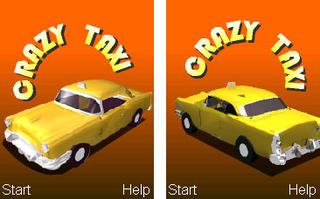


Left car use png file, and right one use vector. When I export the swf file, the file size for the left is 21.6KB and the right one is 90.0KB. When I open file via Flash Lite player, left one needs 233KB to run, and the right one increase to 1825KB. The right one even can't run in the mobile phone, so if you need to use graphic, try to use bmp file.

Flash Lite [ 7 ] Date/Time

You don't need to create a Date object, and you can get the Date/Time value in the Flash Lite. Just use the fscommand2 it provided.

fscommand2( "GetDateDay" );
fscommand2( "GetDateMonth" );
fscommand2( "GetDateWeekday" );
fscommand2( "GetDateYear" );
fscommand2( "GetLocalTime" , "time" );
fscommand2( "GetTimeHours" );
fscommand2( "GetTimeMinutes" );
fscommand2( "GetTimeSeconds" );
fscommand2( "GetTimeZoneOffset" , "timezoneoffset" );

When you use GetLocalTime or GetTimeZoneOffset, and you need to use the variable which mark with orange color. Of couse, you can change to another name you like.

Tuesday, August 30, 2005

Flash Lite [ 6 ] Text

Flash Lite also support three kinds of text,
Static text
Dynamic text
Input text


It will support the Unicode in the Flash Lite 2.0, before that, Flash Lite 1.1 player need to set the language when it implement in the mobile phone. When the mobile phone set language to Big5, it means you can use Traditional Chinese and English. Currently, Flash Lite 1.1 support below languages. You can use GetLanguage( ) to know the language used by the mobile phone. You have to set the font to "_sans", and you can use the font in the device.

Return value:
cs: Czech
da: Danish
de: German
en-UK: UK or international English

en: USA English
es: Spanish
fi: Finnish
fr: French
hu: Hungarian
it: Italian
jp: Japanese
ko: Korean
nl: Dutch
no: Norwegian
pl: Polish
pt: Portuguese
ru: Russian
sv: Sweish
tr: Turkish
xu: The language cannot be determined
zh-CN: Simplified Chinese
zh-TW: Traditional Chinese

Saturday, August 27, 2005

Flash Lite [ 5 ] load..( )

Today, we will talking about the load..( ) in the Flash Lite.
It support four ActionScripts:
loadMovie( );
loadMoiveNum( );
loadVariables( );
loadVariablesNum( );


Currently, I use loadMovie( ) to separate the file, and use loadVariables( ) to provide the strings to support multi languages. There is one thing I need to notice, DON'T use load..( ) in the same frame, because the second one will unworkable, and you will see an error message in the output window as below.

*** Flash Lite Warning - FTPS031: More than one instance of URL Request calls found.

You can see more details information about the error FTPS031 in the authoring_guidelines.pdf. This document included in the Flash ite 1.1 CDK .

FTPS031
Flash player detected more than one instance of URL (getURL( ), loadMovie( ), loadVars( ) and fscommand( ))calls. Only one URL request per frame or event handler is allowed.

In other words, you can use only one of above-mentioned in one frame.

Flash Lite [ 4 ] call( )

We need to use call( ) to substitute for the function( ).

You can write down the ActionScripts in the frame and define the frame label. When you would like to use, just write down,
call("FrameLabel");

If this frame inside a MovieClip which in the scene, use " : " to connect the MovieClip's instance name and frame label. If you would like to trigger this action which isn't in the same level, suggest you use the absoulate path.

In the scene: call("/:Frame Label");
Inside a MovieClip: call("/MovieClipInstanceName:FrameLabel");

Suggest you can create a new scene to put your actions for call, it will easy for debug.

Flash Lite [ 3 ] tellTarget( )

Flash Lite only upport the MovieClip's instance name,
if you would like to change the property or use the variable inside,
and you can use the " _root.NAME ",
but if you would like to control the playhead,
and you need to use "tellTarget("/NAME" )".

For example, if you would like to control a MovieClip which is called "menu" jump to the frame 2, you have to write,
tellTarget("/menu"){
gotoAndStop(2);
}

If you would like to change variable inside this MovieClip, and you can write,
_root.menu.n=43;

Friday, August 26, 2005

Flash Lite [ 2 ] Button event

If you would like to define the UI/Content for the Mobile phone, you need to consider how to use the hardwares button to control it. In the Flash Lite, we can use "Button" to detect these buttons event.

Below are the buttons already defined in the Flash Lite:
4 ways navigation keys: on(keyPress " <Up>"){ } //Up/Down/Left/Right
Left softkey: on(keyPress "<PageUp>"){ }
Right softkey: on(keyPress "<PageDown>"){ }
Enter/Selec keyt button: on(keyPress "<Enter>"){ }
Send key: on(keyPress "<Home>"){ }
Off/End key: on(keyPress "<End>"){ }
Numeric keys (0-9): on(press, keyPress "1"){ }
Star key: on(press, keyPress " * "){ }
Pound key: on(press, keyPress "#"){ }

Other buttons, like "Back" or "Clear". If you would like to use and you will need SW team to provide the relative button.

Thursday, August 25, 2005

Flash Lite [ 1 ] How to start

Macromedia use Flash Lite in the Mobile device, especially for the mobile phone. Currently, it only allow to use the ActionScript before Flash 4. It's difficult for me in the begin, because I start use from Flash 5.

For using the Flash Lite to create the MMI (Man Mechine Interface) in the mobile phone. I need to go back to study the old programming method. Flash Lite didn't support array, function, and need to use tellTarget to control the MovieClip.

Let's go to start using Flash MX 2004 to create a content for the Flash Lite. Suggest you create a template, it will save your time to change the settings, and avoid you forgot something.


Before you save a template, you need to set:
- File size: 176x220 (base on your device's resolution)
- Player: choose Flash Lite 1.1
- Frame rate: 20 ftp


Becuase most of mobile phones use the keys to control, and you will need a "Button" to get the key's event. Suggest you can create one in your template, that will be more convenice for you.

There are lots of ActionScripts used most often, introduce two fist,
fscommand2("FullScreen", boolean);
//This ActionScript will set your content fullscreen or not, but not all devices could be display as fullscreen. So you need to test it in your device. (currently, Nokia support, but SonyEcrisson didn't)

fscommand2("SetSoftkeys", "left", "right");
//This is very important for the mobile phone, most of all have these buttons. Usually, each phone has two and they put beside the 4 way navigation keys/joystick, We call "Softkeys", it means could use software to change the function for the hardware button. Others hardware buttons usuallly have their major function, but the "Softkey" will change dynamically, base on the state. You can choose Flash Lite 1.1>FSCommand2>SetSoftkeys to add this code.