Thursday, September 29, 2005

Notes for online live seminar

Macromedia online live seminar-Tips for Optimizing Flash Lite Content
2005/09/28 9:00 PM US/Eastern

Three ways to optimizing graphics and animations
1. Simplifing animation
When you use tween shape, try to covert to the keyframes and remove the tween settings.

2.Use bmps in place of vectors
It will increase the memory if you use the vectors. So try to use bmp as possible.
Flash Lite [8] Bmp v.s. Vector

3.Adjusting the render quality
Use fscommand2("SetQuality", "low/high") to adjust the render quality.
But you can't test this function via emulation, you need to test it on your device.

Tuesday, September 20, 2005

Flash Lite [16] Update error message

After Flash 8 released, Flash Lite update the error and warnning messages.

  1. Out of Memory
  2. Stack Limit Reached
  3. Currupted SWF
  4. ActionScript Stuck
  5. ActionScript Processing
  6. ActionScript Infinity Loop
  7. Invalid Frame Buffer
  8. Invalid Display Rect
  9. Invalid Frame Number
  10. Invalid Key
  11. Bad JPEG Data
  12. Bad Sound Data
  13. Root Movie Unloaded

You can get more details from this document Developing Flash Lite Applications(p.75-76). It will appears in the output window, but you can't see these informations in your device until Macromedia update the Flash Lite Player.

Sunday, September 11, 2005

Flash Lite [15] Error message

If mobile run flash contenr and appears the "problem with content:6", and it means "Bad JPEG data".Belows are the meanings for the numbers.

  1. Out of memory
  2. Stack limit reached
  3. Corrupt SWF data
  4. ActionScript stuck
  5. Infinite AS loop
  6. Bad JPEG data
  7. Bad sound data
  8. Cannot find host
  9. ActionScript error
  10. URL too long

Flash Lite [14] Input Text

It is very easy to use input text, just setup the text field to input text. Some mobile developers will define the maximum of the text field, so we need to define the maximum characters' value, and it could be workable.

But there is a problem, because it won't focus on the input text field directly. User need to press UP/DOWN to set it focus, as below right state. If the text field as left, it won't open the text input state when user press ENTER.

If you don't like the text field show yellow frame, just write down the below ActionScript.
_focusrect = false;

So you need to use another way to indicate which was focused item.

Flash Lite [13] Include fonts

Dynamic text and input text in the Flash Lite also have the function including fonts, but it will increase the file size, you need to do some evaluations, especially when you use Chinese.

Below means include numbers 0-9, ":", and "/", it will increase 2-3 kb when export to swf file.


You can select "Auto Fill" to add the characters used in this text field, but if you dynamic provide data to it, and you need to add the characters manually.

PS. Flash Lite will add one time when you use the same character with the same font, but you need set each text field which use it.

Friday, September 09, 2005

Flash Lite [12] Scroll Text

We could use Action Script to scroll the dynamic text field. Create a dynamic text, choose multiline, and open "Text" pull down menu and choose scrollable. Paste/Input contents in it and set the var to "content".

You can use slash or dot syntax,

If you use slash syntax, just write down below Action Script in the button.
on(keyPress "<Up>"){
tellTarget("/"){
content.scroll--;
}
}

If you would like to use dot syntax, you need to covert the text field to a MovieClip.
on(keyPress "<Up>"){
_root.page_mc.content.scroll--;
}

Please notice the text field's height, if your device use different font, maybe it will show uncompleted content.

Tuesday, September 06, 2005

Flash Lite [11] setProperty

Flash Lite only allow to use the Instance Name of MovieClip, if you would like to control it's property. You can use slash or dot syntax. If there is a MovieClip named Cube in the stage, and you would like to control it move up when you press "Up" button. You can write as below,

on (keyPress "<Up>") {
setProperty("/cube", _y, _root.cube._y-10);
}

or

on (keyPress "<Up>") {
_root.cube._y=_root.cube._y-10;
}


or

on (keyPress "<Up>") {
_root.cube._y-=10;
}

The property you can use include,
_alpha
_currentframe
_droptarget
_focusrect
_framesloaded
_height
_name
_rotation
_soundbuftime
_target
_totalframes
_url
_visible
_width
_x
_xscale
_y
_yscale

Friday, September 02, 2005

Flash Lite [10] Start/StopVibrate

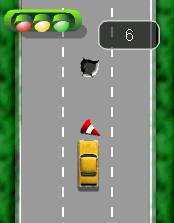
When I try to add sound in the "Crazy Taxi", I found it will influence the performance. So I decide to use "vibrate" to be the feedback when user hit the obstacle.

Flash Lite has two actions about the vibrate
fscommand2( "StartVibrate" , time_on , time_off , repeat );
fscommand2( "StopVibrate" );

Use "StartVirate" to start vibrate, the time_on means when to start the vibrate, the time_off means when to stop thhe vibrate, and then repeat means how many times you would like to repeat. The unit is millseconds.You can see more details in the authoring guidelines p39.

You can use "StopVibrate" when the vibrate occurs.

PS. This function needs fash player support, so you need to test in your device.

Thursday, September 01, 2005

Flash Lite [ 9 ] Test hit

Flash Lite 1.1 didn't support "hitTest", so it is difficult to create the game which needs test hit. Someone will try to use objects' _x, _y, if two objects _x and _y are the same, and we could say they are hited. In this way, you need to use lots of conditional statements, if there are lots of objects need to check. It might be influence the performace, might let mobile phone out of memory.

In the game "CRAZY TAXI", I try to think of another way to test hit. I put lots of objects in this game, and they will appear randomly. User could press Left/Right to control the Taxi to avoid hit the obstacle.

I use variable po to check the Taxi in which lane, when it in the left one,
_root.op=1;

I create a MovieClip to define the obstacles, and use two variables and random the value p to define the obstacle appears in which lane and value k to show different kind of obstacle. When the k=1, it means there is no obstacle will appear.

I write down the conditional statement in the frame, when to obstacle move near to the head of car.

if(_root.po==1 and _root.obs.p==1 and _root.obs1.k!=1){
call("/:hit");
}

I use the frame to define the timing of check. If the car and the obstacle are in the same lane, the car will be defined as hitting the obstacle